|
|


Cursor Editor for Windows


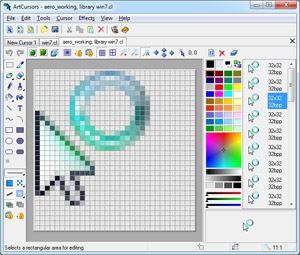 Aha-Soft ArtCursors is an advanced cursor editor for Windows. ArtCursors allows you to find, create, edit, import and export cursors and manage cursor libraries.
With ArtCursors 5.30 you can:
- Create and edit static and animated cursors in color depths up to 16 million colors
- Create and edit cursors for Windows in 32-bit color depth with 8-bit alpha channel
- Create and edit animated .gif images
- Create and store images containing several layers
- Paint images with gradient and chess fill
- Modify images with drop shadow, inner shadow, opacity, smooth, negative, grayscale, colorize, rotate, roll and mirror effects
- Import cursors from .cur, .ani, .ico, .icpr, .wmf, .emf, .bmp, .wbmp, .jpg, .gif, .xbm, .xpm and .png files
- Export cursor images to .cur, .ico, .icpr, .bmp, .jpg, .gif, .png, .xbm, .xpm, .wbmp and .rc files
- Export animated cursors to animated .gif images and image list bitmaps
- Extract cursors from Windows executables, libraries and animated cursor files
- Create cursor libraries for better and more efficient storage
- Collect cursors from folders and subfolders into libraries
- Work with image lists in BMP and PNG formats
- Delete identical cursors in libraries
- Drag and drop files from file shells
- Drag and drop cursors from one library to another
- Drag and drop cursor images from one cursor to another
- Copy and paste cursors in libraries
- Copy and paste images to other applications
System requirements: Windows 95/98/ME/2000/NT/XP/2003/Vista/7/8/10.
Trial limitations: 30-day trial period, nag-screen.
Download (6.5 MB):  exe
zip exe
zip
 How to uninstall ArtCursors from a computer How to uninstall ArtCursors from a computer
View awards ArtCursors has received
Aha-Soft ArtCursors - Make Stunning Cursors For Your Computer
These days, lots of users are using ArtCursors, as it is one of the best software to create animated cursors for websites and Windows and will help to manage cursor libraries, and for this arrow cursors can be helpful. With the help of ArtCursors, you can create different types of stunning cursors for computer and to edit the cursor, you can find cursor editor software.
Are you looking for outstanding cursor editor software? Today, if you browse the Internet, you can easily get different types of cursor editor software. It is really difficult for a layman to find one and also not so easy for an experienced professional.
It will really help you create many different things at the same time. But it is very important that you know all the features about these stunning cursors. This is one of the best cursors available in the market and there are many features of using ArtCursors for any of the animated cursors requirements. You can also look over internet to find the best cursors for computer and you can very easily download in on your computer. You can create shadows and borders with the help of different types of tools. Without losing the quality, you can design different image formats with this edits cursor. ArtCursors can create animated cursors for some other applications. Aha-Soft ArtCursors is wonderful arrow cursor software that will help you to manage cursor libraries, export and import cursors, edits cursor, create and find. Here below are some great features offered by ArtCursors:
- You can easily create cursors for computer and can edit it in .gif images.
- Create animated cursors for Windows XP and other applications.
- You can store and create images with different layers.
- You can enhance picture with chess and gradient fill.
- Aha-Soft ArtCursors will help you to modify images with mirror effects, rotate, colorize, grayscale, rotate, negative, smooth, opacity, shadow and roll.
- Import cursors from PNG, XPM, XBM, GIF, JPG, WBMP, BMP, EMF, WMF, ICPR, ICO, ANI and CUR.
- Export cursors from RC, WBMP, XPM, XBM, PNG, GIF, JPG, BMP, ICPR, ICO and CUR.
- You can easily copy and paste images to different types of applications and libraries.
- Create arrow cursors and drop cursor images from one cursor to another.
- You can easily remove duplicate cursors in libraries.
This software will help you to collect cursors from folders and other subfolders. So, there are many benefits that you can see in this software it is a must buy for a computer savvy.
Tags: animated cursor, cursor editor, cursors for computer, arrow cursor, edit cursor
|
|
Copyright © 2000-2022 Aha-Soft. All rights reserved.
|
|

2019-Mar-23 ArtCursors 5.30
Improved: Support for MacOS icons
2018-Sep-17 ArtCursors 5.29
Fixed: Problems with antivirus software
2016-Jul-28 ArtCursors 5.28
Improved: Ability to import PNG8 images with aplha channel
2016-Jan-28 ArtCursors 5.27
Fixed: Minor bugs
2015-May-10 ArtCursors 5.26
Added: Ability to import multiple files into animated images and sets
Added: Ability to import PNG-coded Mac OS X icons
Added: Support for 768x768 icons for Windows 10
2015-Apr-06 ArtCursors 5.25
Fixed: Small bugs
2013-Nov-25 ArtCursors 5.24
Fixed: Small bugs
2013-Oct-09 ArtCursors 5.23
Addded: Inner Shadow effect
Added: Support for 1024x1024 Mac OS icons
Added: "Close All Files" function
2012-Jul-09 ArtCursors 5.22 Updated: Splash screen
2012-Mar-28 ArtCursors 5.21 Improved: Compatibility with 8
2011-Dec-09 ArtCursors 5.20 Improved: Compatibility with 64-bit Windows 7
2010-Mar-03 ArtCursors 5.18 Added: Compatibility with 64-bit Windows
2009-Feb-19 ArtCursors 5.17
Fixed: Some bugs with ICO files
2007-Feb-06 ArtCursors 5.16
Fixed: Small bugs
2007-Jan-18 ArtCursors 5.15
Added: Feedback and Ready Icons options
2006-Oct-25 ArtCursors 5.10
Added: Support for large WBMP images
Added: Customizable grid
2006-Aug-07 ArtCursors 5.0
Added: Ability to draw smooth lines and shapes
Added: Ability to edit animated GIF images
Added: Arc tool
Added: Crop function
Added: Ability to paint over or replace original pixels
Added: Stroke and other effects
Added: Ability to scan entire computer for icons
Modified: Color palette
2005-Oct-21 ArtCursors 4.21
Added: Ability to copy and paste colors from the clipboard
2005-Jul-11 ArtCursors 4.20
Added: Realtime preview
Added: Support for Borland resource files
2004-Dec-09 ArtCursors 4.12
Added: Hue/Saturation effect
Added: Color replacement
2004-Oct-25 ArtCursors 4.10
Added: Smooth resampling
...
|
|
|
|
























 Overview